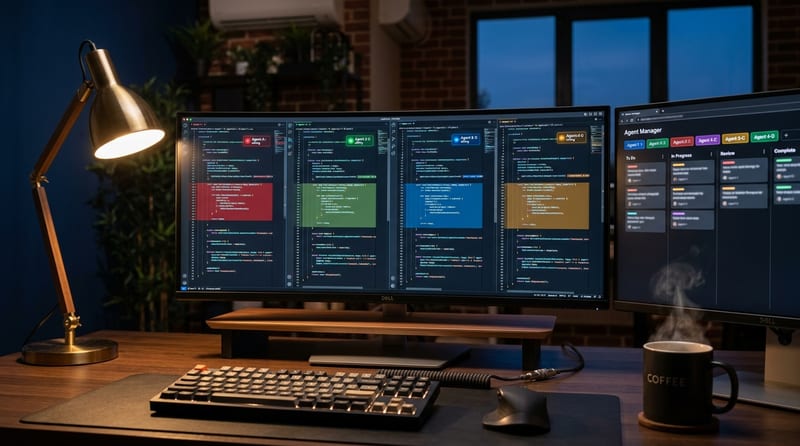
When Kilo Code v7 for VS Code topped Product Hunt as #1 Product of the Day and #1 Product of the Week in May, the headline number was the social proof — but the real story is what's underneath the badge. The Amsterdam-based open-source team didn't ship a feature update. They threw out the old extension and rebuilt the entire thing on OpenCode server, an MIT-licensed portable core that now powers every Kilo surface. Same icon, completely different engine.
It is, by some distance, the most ambitious thing an open-source AI coding agent has shipped this year — and the rare case where the rebuild was loud enough to break Product Hunt and quiet enough to roll out through a routine VS Code extension update.
What actually changed under the hood
The previous extension reached 2.2 million developers, but everything Kilo shipped — CLI, JetBrains, Cloud Agents — was still running VS Code internals it didn't always need. The rebuilt v7 swaps that out for a single portable core based on OpenCode, which means improvements to the core now land everywhere at once.
The headline capability is parallelism at every layer:
- Parallel tool calls — file reads, terminal commands, and codebase searches run concurrently instead of one-after-the-other.
- Parallel subagents — when a task is too large for a single prompt, Kilo spins up specialists (implementation, tests, docs) that run simultaneously and merge results back to the parent agent.
- Custom subagents — teams can define their own roles that match how they actually ship.
That sounds like marketing copy until you sit in front of it. The bottleneck in agentic coding has historically been sequential I/O on a smart-but-slow model, not the model itself. Kilo's bet is that you fix the wait time before you fix the reasoning.
Agent Manager: the part that looks like Chrome
The new Agent Manager is a tabbed control panel for parallel work. Each tab is an independent agent — give one a refactor, another a feature branch, a third a code review — and switch between them like browser tabs.
| Feature | What it does |
|---|---|
| Worktree-per-agent | One click creates a git worktree so each agent gets its own copy of the repo. No stepping on each other's code. |
| Same-worktree mode | For read-heavy collaboration — one agent codes, another reviews the live diff. |
| Inline diff reviewer | Unified or split view of every file an agent touched, before you apply anything. |
| Line-level comments | Click a line, type feedback, "Send all to chat" — feedback returns to the agent as structured context with file path and line number. |
| Multi-model side-by-side | Run Claude, GPT, and Gemini on the same prompt and compare actual work, not benchmark charts. |
"This turns agent-assisted development into something closer to a real code review workflow: targeted conversation about specific lines of code, not approval or rejection of an entire changeset." — Kilo's GA announcement
The multi-model comparison piece is the under-rated feature. The whole "which model is best for code?" debate has been benchmark-driven for two years. Kilo just made it prompt-driven — your prompt, your repo, three models, side by side.
Cross-platform sessions and 500+ models, no markup
Because the extension and CLI now share the same portable core, sessions follow you. Start a task in the CLI while SSHed into a production server, reopen it in VS Code at your desk, share it with a teammate in Slack. Continuity is structural, not a bolt-on sync feature.
The model story is the part that distinguishes Kilo from most of the commercial competition: 500+ models across every major provider, BYOK supported, local inference supported, and zero markup on what you pay for tokens. The recently announced $8M seed round funds the company, not a margin on your Claude bill.
Five built-in modes ship by default:
- Code — writes and edits production code.
- Architect — plans features and designs systems before touching code.
- Debug — traces errors and proposes fixes.
- Ask — answers questions about your codebase.
- Orchestrator — coordinates multi-step tasks across the other modes.
The thing the Product Hunt comments will not let go
Worth being honest: v7 is not a unanimous love letter. Scroll the GA announcement comments on Kilo's blog and you'll see early adopters asking how to roll back to v5, complaining that v7 "feels faster but the model seems dumber," and reporting prompt-following regressions. Kilo's team has been actively triaging this in their Discord #vscode channel, but a complete engine swap was always going to produce a tail of "it used to do this" tickets.
If you depended on a specific v5 behavior in a tight loop, test before you upgrade. If you're new, you're getting v7 by default and the rough edges are largely already smoothed.
Try it
# In VS Code: search "Kilo Code" in the Extensions view
# or grab it from the Visual Studio Marketplace:
# https://marketplace.visualstudio.com/items?itemName=kilocode.Kilo-Code
The repo lives at github.com/Kilo-Org/kilocode — Apache-licensed agent core, OpenCode-based, Amsterdam-made. If you already have Kilo installed, v7 arrives through the normal extension update path; auto-update handles everything.
The Bottom Line
The interesting move with Kilo Code v7 is not the Product Hunt sweep or the $8M seed. It is the architectural choice underneath: a portable open-source core that runs natively in your editor, your terminal, and your team chat — with parallel agents, worktree isolation, inline review, and a real multi-model bake-off built into the workflow. If you've been on Cursor, Copilot, or Windsurf and wanted something that treats AI coding like a team of agents instead of a single chat box, this is the version of Kilo worth installing. The early adopters will keep filing v5-vs-v7 bug reports, but the bet has been placed — and for an open-source project, it is a serious one.